Here’s the story behind Velcro, the internet-wide module resolver, the client-side bundler and the interactive playground.
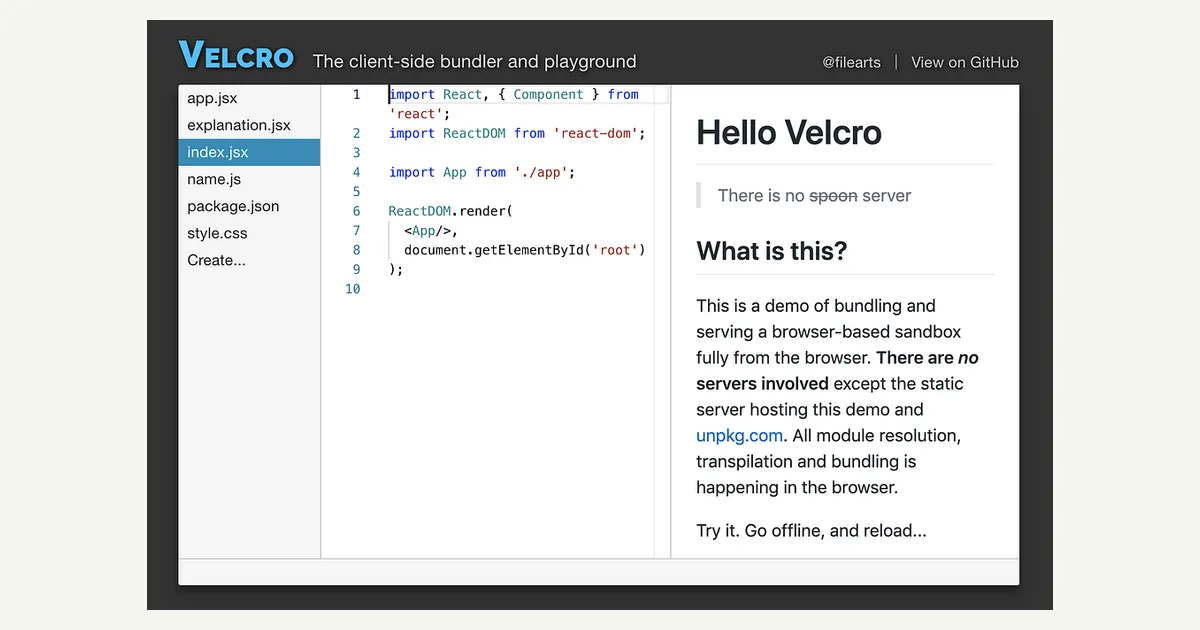
The interactive Velcro playground, where you can create apps from within your browser.
Where it all started
Velcro is a system of JavaScript modules that I’ve been working on for several months that aim to bridge the gap that has been widening between the code we write and the code we ship.
I’m the creator of Plunker, which is a front-end development environment and community. When Plunker came to be, things were simple; you had an index.html file, a few stylesheets and a few scripts that you referenced using <link rel="stylesheet"> and <script src="script.js"> tags, respectively. Typically people wrote JavaScript using only the language features that would actually run. People worked around CSS inconsistencies the hard way: with -moz-wtf- prefixes and all.
In those days, building a front-end fiddle was easy(er). Today, it no longer is.
It so happens that I still want to build the best front-end fiddle I can and I want my users to have that same idiomatic, frictionless experience that brought them to Plunker so many years ago. But today that isn’t quite so easy. There’s bundling, TypeScript, ES Modules, ESNext, and a panoply of other things introduced to bring power, expressiveness and modularization to the front-end domain.
So why Velcro?
In the spirit of bringing back the frictionless bliss from the early days, I’ve been hard at work building a suite of tools to help bridge the gap between expectations and experience.
I decided to call this suite of tools Velcro. Just like the toddler-friendly material, Velcro is a re-usable, foolproof and idiomatic way to put things together and get them to stick.
That sounds great, but how does it work?
Right, that’s probably why you’ve read this far, isn’t it?
I’ve been working on building Velcro in layers. Each successive layer is composed of components at lower layers and offers an increasingly high-level API and experience.
The level I started at is resolving. Resolving code has become increasingly complicated and I needed a way to simplify this. You have conventions like index.js to deal with, file extensions (and more are added with every new framework!), browser field overrides and who knows what else?
As developers moved their workflows to npm modules, they effectively imposed the Node Module Resolution Algorithm on all their tooling. Alas, the best, most versatile open source implementations make some assumptions that didn’t align with my vision. I wanted an internet-scale resolver. Plunker lives in the cloud and shouldn’t be bound to a single root filesystem.
Design decision 1: Velcro deals in URLs (WHATWG URLs, to be precise)
Working with URLs means that not all assets need to be found in the same place. Maybe the files that users author in Plunker are at a virtual file:// system and the npm modules they import come from unpkg.com (or jsDelivr). Thinking in terms of URLs opened portals into totally new possibilities.
Design decision 2: Velcro resolution happens against abstract host interfaces
If you’ve spent some time in the TypeScript or vscode codebases, you might be familiar with the concept of a host interface. These host interfaces represent the set of logical operations and properties that are required to satisfy the needs of a consumer.
The concept of an abstract host interface meant we could build things like build an unpkg host or even a Monaco Editor host. If we take this further, we could even build a compound host that would delegate to different child hosts according to the url prefix. And since we might never have a persistent file-system around, why not build a resolver host that acts as a read-through cache to IndexedDb?
Design decision 3: The resolver host interface
I wanted the resolver host interface to expose the minimum set of primitives on which everything else could be built. These should be mutually-exclusive and collectively exhaustive (aka MECE, which I learned back when I was still an accountant).
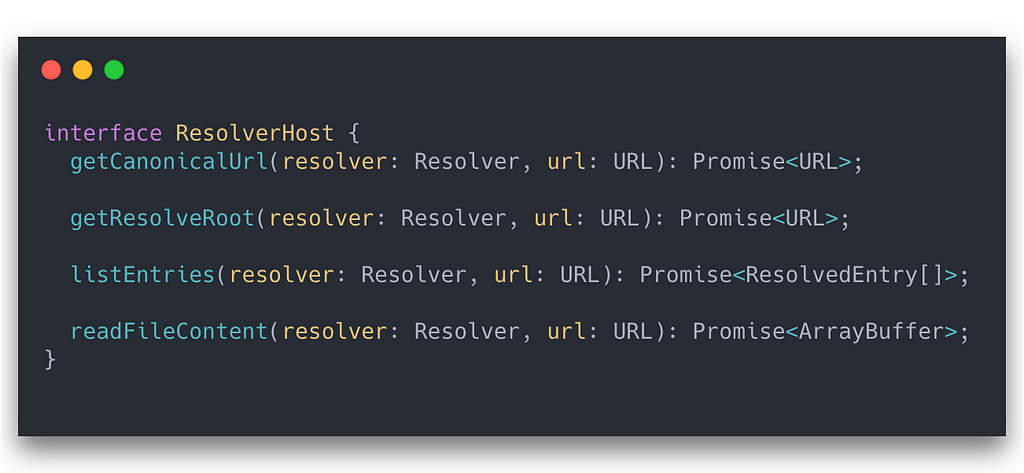
The ResvolerHost interface
getCanonicalUrl: Take a URL and get its canonical representation. On a filesystem this might mean resolving symlinks whereas on unpkg, it might mean resolving an abstract semver range to a single canonical version. This might be an identity function on some hosts.
getResolveRoot: Get the logical root for a given url. This root url is the url above which it wouldn’t make sense to continue traversing upwards. On a filesystem this might be file:/// but on unpkg, it might be https://unpkg.com/@velcro/[email protected]/.
listEntries: Given a url, list the child entries (currently files and directories) that it contains. This only makes sense on directory entries.
readFileContent: Read the content of the file at a given url as an ArrayBuffer. I didn’t want to make any assumptions about whether files could be represented meaningfully as text (think WASM / WASI) so I opted for the lowest common denominator. Luckily we have TextDecoder to get ourselves out of the madness of utf8 encoding decoding.
You can check out the interface on GitHub as of the writing of this blog post.
What does that give us?
That’s right, those are the key operations you need to be able to harness the ULTIMATE POWER of flexible, internet-scale node module resolution.
With those simple primitives, you can build out some very powerful abstractions:
resolve(url: URL, options): Take an input url and resolve the actual file (if any) that you would expect if the Node Module Resolution algorithm was respected. Also, add in a sprinkle of browser overrides and other crazy bits of complexity we’ve gotten ourselves into. You can see how the Node Module Resolution algorithm was implemented in Velcro on GitHub here.
resolveParentPackageJson(url: URL, options): Well it turns out that being able to resolve a parent package.json file is pretty handy when you start seeing nested package.json files having their own browser overrides. You can see the implementation here.
Wrapping up and next steps
So with all that we’ve seen how to resolve files as if we were an internet-spanning npm. What we haven’t seen is how to resolve from one file to another or how this all fits into the larger context.
In later articles we’ll cover that as well as some other really interesting tidbits like:
- How to compose resolver hosts for different use-cases
- Handling Node built-in modules when there is no Node
- Parsing ASTs to find dependencies
- Bundling in the browser
- Multi-level source-map hacks in the browser
- Running an iframe-based preview without any server
I hope you enjoyed and will follow along for the rest of the ride!
Don’t forget to subscribe to get updates and to check out the playground at https://ggoodman.github.io/velcro and the source code for the project at https://github.com/ggoodman/velcro.
Originally published on Medium.